
Rogue DHCP Detector
DHCP Spoofing is a real thing. Businesses face these attacks when an unauthorised device (employee’s personal router or compromised machine) acts as a DHCP server and hands out false IP, DNS and default gateway configurations to connecting devices. A common man-in-the-middle vector.
By hijacking how traffic flows, attackers can funnel endpoint data through a system they control and read it. This can also lead to network outages, particularly for email and collaboration systems, as IP addresses outside the corporate scope lose the ability to access internal resources (printers and servers). An incident like this can result in loss of productivity, customer dissatisfaction, increase of help desk volume, potential regulatory or compliance exposure and missed SLA agreements with resulting penalties. This device should be avoided on ANY network.
So I wanted to figure out a system that a would help identify these unauthorised DHCP servers on a network. The Python script listens for DHCP responses on the network and if it detects a DHCP server not listed in the text file, it flags it as a rogue DHCP server, letting you catch and shut down the threat before it gets out of hand.
How it works
~
How it works ~
Using NMAP for Reconnaissance
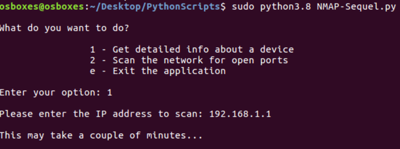
NMAP is an open source network scanning tool used to discover hosts, open ports and other information about the network. It sends various types of packets to the target device and analyses the replies it receives.
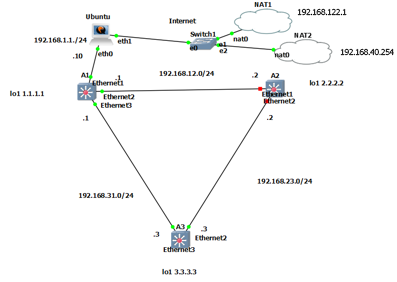
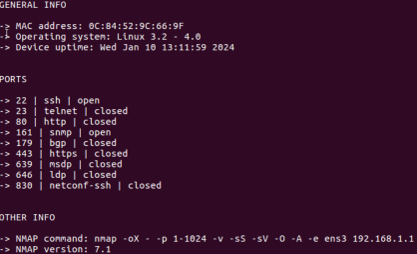
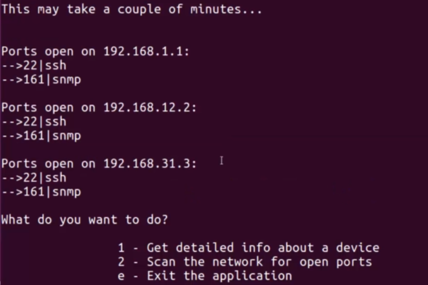
This is a network scanner using the Nmap module. It profiles individual devices (OS, MAC, uptime, open ports and services) or sweeps the network for open ports across hosts. We can see the Arista switches have their SSH and SNMP ports open.
if user_input == "1":
    #Initializing the port scanner
    mynmap = nmap.PortScanner()
Using Scapy for Packet Sniffing
Network packet sniffers have legitimate, valuable uses. They enhance security monitoring, support penetration testing, allow you to verify that data is properly encrypted and help analyse network traffic to identify bottlenecks. But it goes both ways - one way attackers carry out a reconnaissance attack is by using a packet sniffer to quietly monitor and gather information about a network.
In the Python script, I’ve added a clause statement that if the interface is different to the loopback interface (1.1.1.1), the rogue DHCP server detector will start:
for interface in interfaces:
    if interface != "lo":

        hw = get_if_raw_hwaddr(interface)[1]
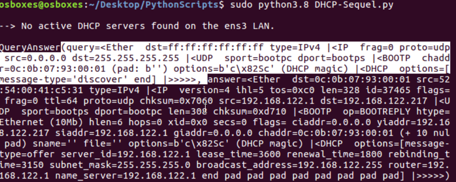
Putting it all together

DHCP Discover packet
If the DHCP Discover packets get a response, the script prints out the DHCP server information for that interface of the Ubuntu VM. It then loops through each server that replied and checks its IP against the allowlist in dhcp.txt. A match means the server is legitimate and gets flagged OK!
Anything not on that list is flagged ROGUE! with its IP and MAC address printed so it can be tracked down. If no servers respond at all, the script reports that no active DHCP servers were found on the LAN.
Option 2 output
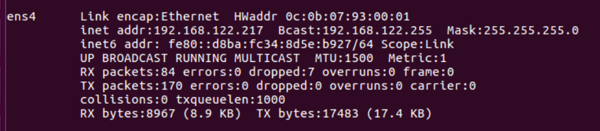
Address 192.168.122.217 assigned to eth1 by Cloud device via DHCP therefore NAT device is our legitimate DHCP Server
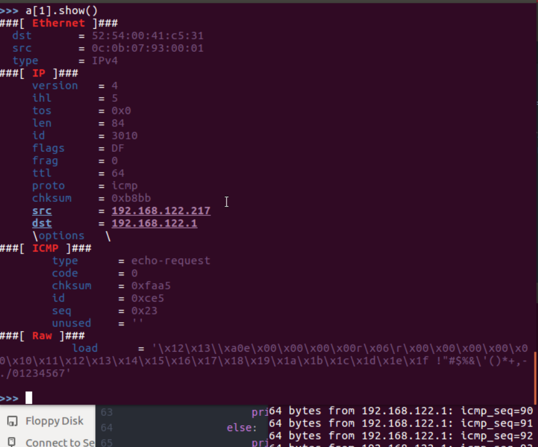
While running ping to 192.168.122.1 in a separate terminal, ‘sniff’ function analyses packet

if ans:
    print("\n--> The following DHCP servers found on the {} LAN:\n".format(interface))

    for mac, ip in mac_ip.items():
        if ip in allowed_dhcp_servers:
            print("OK! IP Address: {}, MAC Address: {}\n".format(ip, mac))
        else:
            print("ROGUE! IP Address: {}, MAC Address: {}\n".format(ip, mac))

else:
    print("\n--> No active DHCP servers found on the {} LAN.\n".format(interface))
Option 1 output
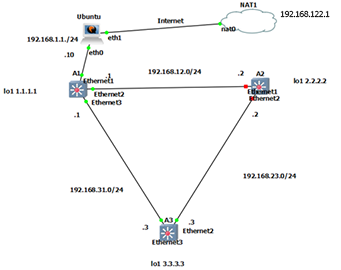
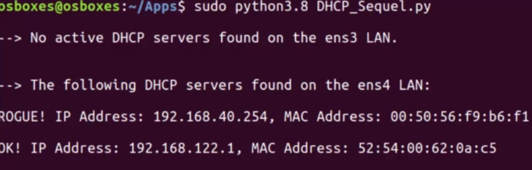
A rogue DHCP server detected, successfully
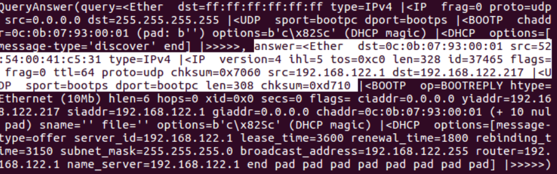
DHCP Reply packet
The result: NAT2 is identified and labelled as an unauthorised DHCP

Our NAT1 IP address is in the dhcp.txt file